
Main Floating HUD
-
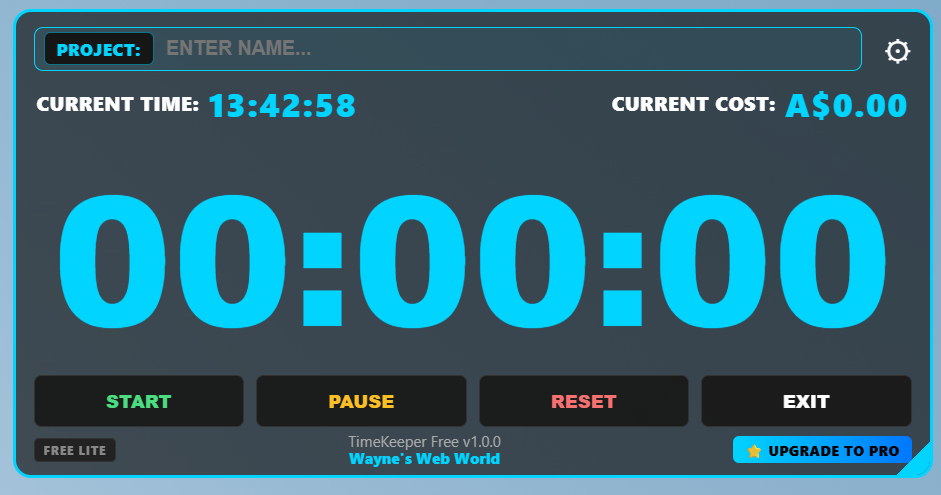
Floating On-Top HUD: Pin the window directly over Illustrator, Photoshop, VS Code, or your web browser with adjustable background transparency.
-
Live Running Cost Engine: Automatically converts tracked project time into dollars using your customizable 5-minute block rate.
-
Smart Grace Period Logic: Calculates billing using a freelance-standard 3-minute grace period rule (extra time under 3 minutes rounds down; time over 3 minutes rounds up).
-
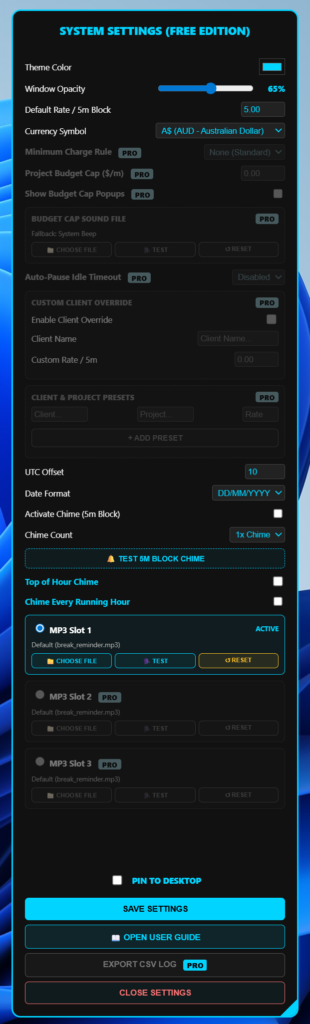
Multi-Currency Support: Easily select your local currency symbol ($ USD/AUD, A$, €, £, ¥, ₹, CA$, CHF, kr).
-
One-Click CSV Log Export: Export detailed work records (Date, Time, Project Name, Duration, and Cost) directly to
timekeeper-log.csvon your Desktop. -
Excel Reporting Sync: Integrates seamlessly with external Excel workbooks (
Project_Time_&_Cost_Reports.xlsx) for automated client invoicing and earnings analysis. -
Interval Chime Reminders: Optional 5-minute audio alerts keep you aware of session length and work blocks.
-
Responsive Resizing: Drag the corner handle to scale the window—timer digits adjust automatically while preserving high contrast.
System Settings Panel
TimeKeeper: Free Edition vs. Pro Edition Comparison
Key Feature & Benefit Breakdown
-
Core Time Tracking: The Free Edition provides baseline stopwatch and timer tracking, whereas the Pro Edition adds global system hotkeys (
Ctrl + Alt + Sto Start/Pause,Ctrl + Alt + Rto Reset) to control your timer from inside Illustrator, Photoshop, or VS Code. -
Cost & Revenue Monitoring: The Free Edition tracks elapsed duration, while the Pro Edition dynamically calculates running job costs live on your HUD using custom currency symbols (
$,A$,€,£, etc.). -
Revenue Protection & Budget Alerts: The Pro Edition introduces continuous budget cap monitoring (dollars or minutes) with 80% and 100% capacity alerts, modal popups, red text warnings, and custom audio file support with native system beep fallbacks.
-
Automated Workflow & Presets: The Pro Edition unlocks a Client & Project Presets Manager to load client rates with 1-click, minimum charge rules (e.g., 5m/10m/15m blocks), and idle auto-pause detection.
-
Custom Audio & Reminders: The Free Edition includes standard system chimes, whereas the Pro Edition features top-of-the-hour chimes, running-hour reminders, 3 custom MP3 slots, and a dedicated budget alert sound picker.
-
Reporting & CSV Logging: The Pro Edition logs session data directly to
timekeeper-log.csvon your Desktop, fully formatted for 1-click integration with Excel reporting templates (Project_Time_&_Cost_Reports.xlsx) and an in-app revenue dashboard.
| Feature / Capability | Free Edition | Pro Edition |
| Core Stopwatch & Session Timer | Included | Included |
| Global Windows Hotkeys | Manual Click Only | Included (Ctrl + Alt + S / R) |
| Live HUD Running Cost Display | Not Included | Included (Multi-Currency) |
| Budget Cap Alerts (Dollars / Mins) | Not Included | Included (80% & 100% Triggers) |
| Custom Budget Alert Sound / Beep | Not Included | Included |
| Idle Auto-Pause Detection | Not Included | Included (3m, 5m, 10m) |
| Client & Job Presets Manager | Not Included | Included (1-Click Load) |
| Dual Billing Rates & Minimum Rules | Default Only | Custom Rates & Min Block Rules |
| Audio Reminder Engine | Standard Chime | Top/Running Hour + 3 MP3 Slots |
| In-App Revenue Dashboard | Not Included | Included (Today, Week, All-Time) |
| Direct CSV Log Export & Excel Sync | Not Included | Included (timekeeper-log.csv) |
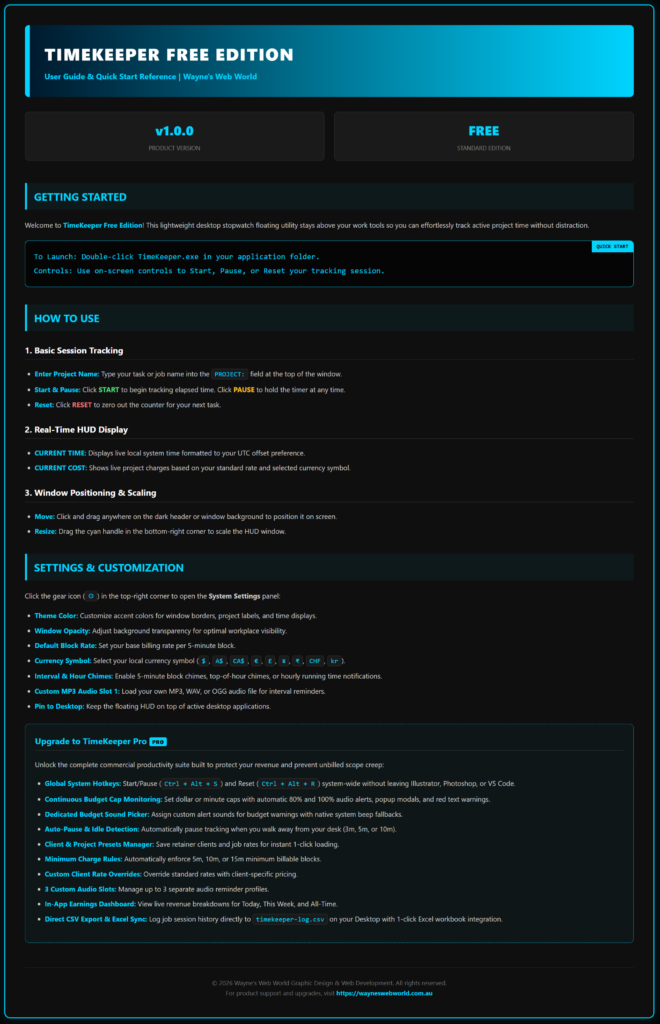
In-App User Guide
-
OS: Windows 10 / Windows 11 (64-bit)
-
Type: Standalone Portable Desktop Application (No installation required)
